
How to View an End of Day Report
This document covers a step-by-step guide to generating an End of Day Report in the Basket Point of Sale system.
- Using the navigation drop-down menu, on the upper left hand corner of the screen, select Sales > End of Day Report.
From there you will be able to filter by the date you wish to view, and for which location, region, or for a broader view, all stores.
Understanding the End of Day Report
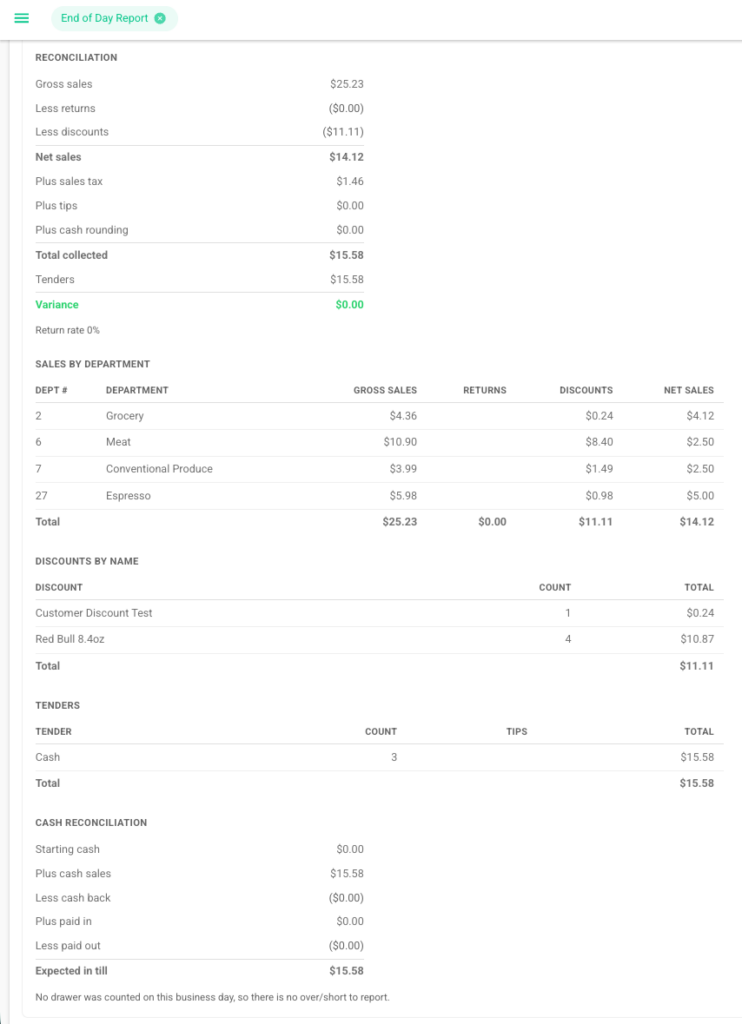
Once the End of Day Report is generated, it provides a summary of the store’s activity for the selected business day. The report includes Reconciliation details such as gross sales, returns, discounts, net sales, taxes, tips, total collected, tenders, and any variance. It also breaks down Sales by Department, allowing you to review gross sales, returns, discounts, and net sales for each department. The report includes Discounts by Name to show the number and total value of discounts applied, as well as a Tenders section summarizing transactions by payment type. Finally, the Cash Reconciliation section shows the starting cash, cash sales, cash back, pay-ins, pay-outs, and the expected amount in the till. If a drawer was counted, the report will also display the drawer variance to help identify any differences between the expected and actual cash amounts.
How to Export the End of Day Report
Once the End of Day Report has been generated, you can export the report for recordkeeping or further review.
- In the upper-right corner of the End of Day Report, select Export.
- The report will be downloaded as a file to your device.
- Open the exported file to review, save, print, or share the End of Day Report as needed.