
A back office that does not fight you.
Items, costs, pricing, taxes, tenders and users in one cloud back office, connected directly to your lanes. No clunky legacy screens, and no second system for shelf tags.
Run the catalog from one place
Create and update items in bulk
Upload a CSV, map your columns to Basket’s item fields, and save the mapping as a template for next time. Every row reports Success, or the reason it failed.
Set the details that matter in grocery
Each item carries its base price, case cost and case count, plus flags for EBT, WIC and scale items. Organize items by department and category.
Prices from your rules
Turn on “Auto Generate Item Prices” during an upload and Basket sets base prices from the price rules for each department and category.
Taxes and fees that fit
Use percent or flat rates. Exempt EBT items. Apply a fee to everything, to selected departments, or to individual items, store by store.
Access for the right people
Invite users and give each one only the stores and departments they need. Cashiers and receiving staff can have a device PIN with no back office access.
Built for many stores
Set up stores, departments, categories, tenders, shifts and fiscal calendars. Basket handles multi-store chains and hundreds of thousands of products.
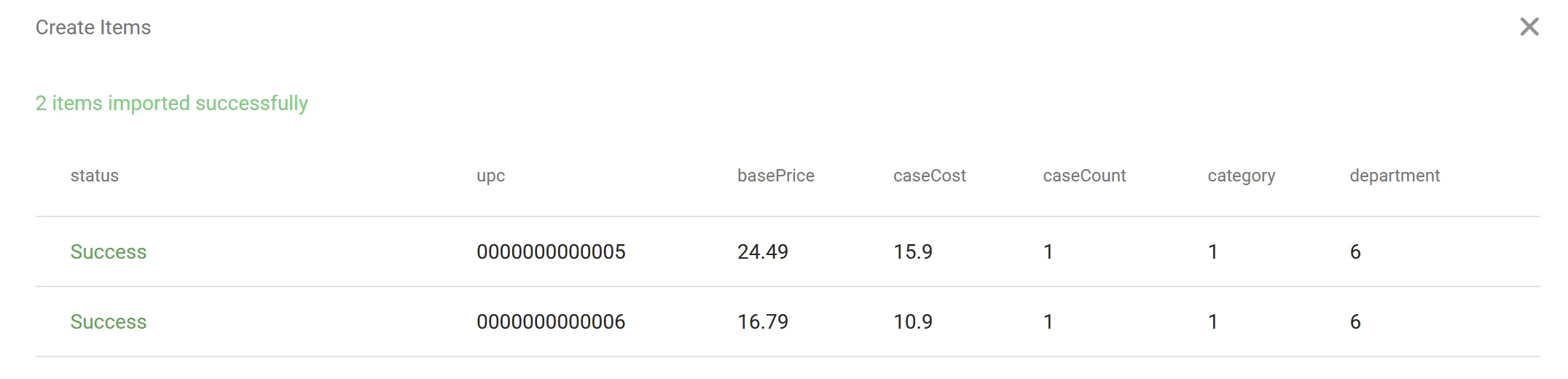
Import a catalog, then check every row
Bring in your item list from a spreadsheet instead of keying it by hand. After the upload, Basket lists each item with its status so you can fix anything that did not save.
- Map spreadsheet columns to item fields
- Save mappings as templates
- Bulk update existing items the same way
At a glance
- Item import
- CSV upload with column mapping and saved templates.
- Bulk updates
- Update many items at once from a CSV.
- Item flags
- EBT, WIC and scale items, with base price, cost and case count.
- Taxes and fees
- Percent or flat. EBT-exempt option. By all items, department or item.
- Access control
- Per user, by store and department. PIN-only access for device staff.
- Scale
- Multi-store operations and hundreds of thousands of products.
Common questions
Can I import my existing item list?
Yes. Upload a CSV, map each column to the matching Basket field, review the rows, and save. Invalid fields in the file can cause an item to fail to save, so Basket shows a status for every row.
Can I update many items at once?
Yes. Use Bulk Update Items and upload a CSV with the changes.
Can different employees see different stores and departments?
Yes. When you invite a user, you choose exactly which stores and departments they can access. Staff who only need the register or receiving device can be given a PIN without back office access.
Can a tax or fee skip EBT items?
Yes. Turn on the EBT exempt option for that tax or fee.
Does the back office support more than one store?
Yes. Basket is built for multi-store operations, and you can set up and manage every store, its tenders and its users from the same place.
Related reading
The rest of the Basket platform.
- Point of sale
Cloud checkout that works with any processor and keeps selling offline.
- Pricing and promotions
Margin-based price rules, TPRs and promotions, with discount reporting.
- Analytics and reporting
Real-time dashboards and a report builder for sales, margin and shrink.
- Inventory management
Receiving, shrink and counts from a handheld, with live on-hand reports.
- Customer engagement
Points, offers and club rewards in a shopper app tied to checkout.
- Ecommerce
A branded online store with pickup, delivery and a picking app, on your own catalog.
- Purchasing and vendors
Purchase orders by vendor and store, with vendor records and costs in one place.
- AI invoice scanning
Scan a vendor invoice to receive a delivery, and create new products from the same scan.
- Tag printing
Design your own tags and print them with each store’s prices to Zebra or PDF.
See back office in action.
Tell us about your stores and we will reply by email to set up a demo.
Already a customer? Contact support.